How to Update RSpace on SURF Research Cloud
Updating RSpace on Research Cloud. Overview. Updating RSpace on Research Cloud means replacing your existing Workspace while keeping your data intact. You can do this by deleting the Workspace but ke…

Updating RSpace on Research Cloud
Overview
Updating RSpace on Research Cloud means replacing your existing Workspace while keeping your data intact. You can do this by deleting the Workspace but keeping the storage volume, then redeploying a fresh Workspace pointed at that same volume. Since a new deployment always pulls the latest stable version of RSpace by default, this is also how you get RSpace updates.
Step 1: Delete the Workspace
On the Dashboard, go to the Workspaces tab, find the Workspace you want to update, and delete it. You will see the delete option by clicking the 3 dots, then Delete.
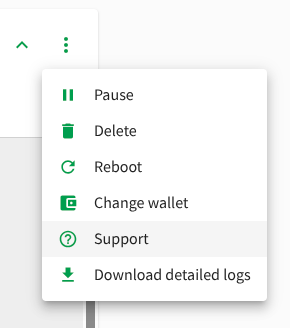
Step 2: Wait for deletion to finish
Give it a few minutes until the Workspace fully disappears from the Workspaces tab. Your volume will still show up under the Storage tab but will change from Status: In Use to Status: Available. Wait until it switches to Status: Availalbe.
Step 3: Redeploy the Workspace
Follow the same deployment steps as the install (found here), with a few things to keep consistent:
- Storage volume name: enter the exact same volume name you used previously. This is what links the new Workspace back to your existing data.
- Workspace name and hostname: if you want to keep the same hostname, give the new Workspace the exact same name as before. Since the old one has finished deleting, there will be no conflict.
- Expiration date: set a new date in the future. This is when the new Workspace will automatically shut down. If you plan on using it for a long time, set it a year or two out so you are not caught off guard by an unexpected shutdown.
Once submitted, the Workspace will go through the same creating state as a fresh deployment, and should be up within 5 to 10 minutes.
If you have any questions about this guide, please email support@researchspace.com!
How did we do?
How to connect to Research Drive from RSpace running on Research Cloud
How to Install RSpace on SURF Research Cloud